CCTV Installation Guide (2026): Cost, Placement & Pro Checklist

CCTV Installation Guide (2026): Cost, Placement & Pro Checklist
If you’re searching “CCTV installation”, you want one thing: footage that’s actually usable when something happens. Not blurry night video. Not cameras pointed at glare. Not a system that stops recording when the internet drops out.

This guide walks you through what matters in a real-world install: camera placement, recording/storage, remote viewing, and the quote questions that stop you getting ripped off.

ASC has been delivering security solutions for over 40 years, including CCTV supply, installation and ongoing support by licensed technicians.

What a “good” CCTV installation looks like (in plain English)


A proper CCTV system should give you:

  • Clear images at entry points (faces, not just movement)
  • Reliable recording (correct settings, sensible motion zones, enough storage)
  • Secure remote viewing (without exposing your system to the internet)
  • A clean, safe cable run (not DIY spaghetti across the roof)
  • A proper handover (admin access, passwords, instructions, warranty)


If you don’t get those outcomes, it doesn’t matter how many cameras you bought.

Retail wireless CCTV vs commercial wired CCTV (what’s actually different)


A lot of people compare “wireless vs wired” like they’re equal options. In reality, they’re often two different categories:

  • Retail wireless systems (DIY kits, Wi-Fi cams, battery cams, app-first, sometimes cloud subscriptions)
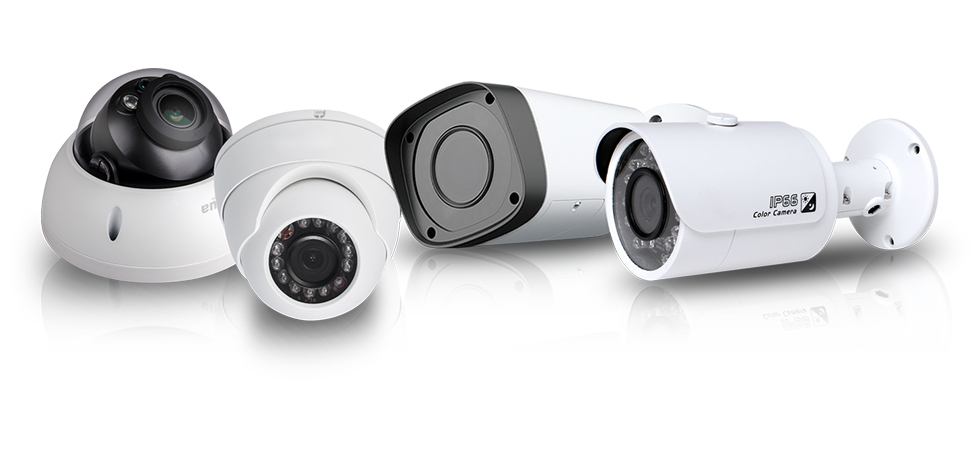
  • Commercial wired systems (PoE cameras, NVR/VMS recording, structured cabling, designed for reliability and scale)


Neither is “always better”. The right choice depends on risk, layout, and how much you care about evidence-grade footage.


Retail wireless systems (DIY / Wi-Fi / battery)


Pros

  • Fast to install (often same day)
  • Lower upfront cost (minimal cabling)
  • Great for rentals or temporary coverage
  • App setup is usually simple
  • Cloud features can be convenient (alerts, clips, sharing)


Cons

  • Reliability depends on Wi-Fi strength and interference (dropouts happen)
  • Battery cameras can miss events if settings aren’t tuned (sleep/wake behaviour)
  • Limited control over retention and recording quality in many systems
  • Often rely on internet/cloud subscriptions for full features
  • Can get messy at scale (more cameras = more Wi-Fi load + more failure points)
  • Cyber risk rises if accounts/passwords are weak or firmware is neglected


Best fit

  • Low to medium risk homes
  • Rentals where cabling isn’t allowed
  • Quick deterrence and general visibility
  • Short-term installs


Commercial wired systems (PoE cameras + NVR/VMS)


Pros

  • High reliability (each camera has a dedicated wired link)
  • Stable video quality (better evidence, especially at night)
  • Scales cleanly (adding cameras doesn’t “crowd” your Wi-Fi)
  • Local recording keeps working even if internet drops out
  • More control over storage, retention, motion rules and image settings
  • Stronger security posture when configured properly (segmentation, controlled access)


Cons

  • Higher upfront cost (cabling and labour)
  • More install complexity (roof access, wall penetrations, compliance/safety)
  • Needs proper design and commissioning (not “plug and play”)
  • Not always practical in some rentals or restricted buildings


Best fit

  • Businesses and higher-risk homes
  • Sites needing evidence-grade footage and longer retention
  • Any site where missed footage is unacceptable
  • Multi-camera installs (6+ cameras) where reliability matters


The practical recommendation


If you want a simple rule-of-thumb:

  • If you want convenience + general visibility, retail wireless can be fine.
  • If you want reliability + usable evidence, commercial wired is usually the better choice.


Hybrid approach (often the smartest):

  • Wired cameras for critical points (front door, driveway choke point, side gate, cash/stock areas)
  • Wireless cameras for secondary angles where cabling isn’t worth it


That gets reliability where it matters without overspending on cabling everywhere.

What drives CCTV installation cost


There isn’t one “standard price” because cost depends on design and difficulty, not just camera count.

The biggest cost drivers are:


  • How many areas you’re trying to cover properly (coverage plan matters more than camera quantity)
  • Cabling complexity (double-storey, brick walls, long runs, tricky roof access)
  • Night performance requirements (cheap cameras fail at night)
  • Recorder and storage (how many days you want to keep footage)
  • Remote access setup (done securely vs “quick and unsafe”)
  • Integration (alarms, access control, intercoms, monitoring)


If two quotes are far apart, don’t ask “why so expensive?” — ask what outcome is different.

Camera placement: the #1 reason CCTV systems fail


Most CCTV systems technically “work”, but fail when you need them because placement is wrong.


The rule that matters


You need identification, not just detection.


That means:

  • Capturing faces at entry points
  • Capturing choke points where everyone must pass
  • Avoiding angles that show the top of a head or a silhouette


Entry point placement tips

  • Front door: capture a face as they approach, not after they’re under the eave
  • Driveway: cover approach and departure (two angles can be ideal)
  • Side access: common “quiet entry” route — don’t ignore it
  • Rear doors/sliding doors: often poorly lit, often targeted
  • Business interiors: cover cash handling, high-value stock, after-hours entry paths


If an installer can’t explain the placement logic clearly, you’re buying hardware, not a solution.

Choosing the right cameras (what matters and what’s marketing)


Megapixels don’t fix bad setup

High resolution won’t help if:

  • the camera is too high
  • the subject is too far away
  • the image is backlit or washed out
  • the lens is wrong for the distance


What matters more than “4K”

  • Strong low-light performance
  • Wide Dynamic Range (WDR) for glare and bright backgrounds
  • Correct lens selection for the distance you need to identify at
  • Weather rating and vandal resistance where required


Recording and storage: don’t leave this to chance

Two decisions determine whether your system is useful later:


1) How many days of footage do you need?

A lot of people choose “a few days” then realise incidents get discovered late. Storage should match your risk, not a guess.


2) Motion vs continuous recording


Motion recording is normal, but only works well if it’s configured properly:

  • sensible motion zones (avoid trees and roads where possible)
  • correct sensitivity
  • correct night settings
  • correct frame rate and bitrate


A badly configured recorder produces “video” but not usable evidence.

Remote viewing and cybersecurity (do it safely)


Many CCTV “security incidents” come down to lazy remote access setup.

Minimum standards you want:

  • Default passwords changed immediately
  • Separate user logins (not everyone using admin)
  • Firmware kept updated
  • Remote viewing set up without insecure exposure
  • Admin access removed when staff/tenants change


When reviewing a quote, ask:
“How do you set up remote access, and how do you keep it secure?”
If the answer is vague, treat it as a red flag.

Installation quality: what separates pros from “camera chuckers”


A quality install includes:

  • tidy cabling, properly secured
  • correct terminations and labelled runs
  • clean mounting, correct heights and angles
  • correct network configuration
  • test and handover with the client


Optional but smart upgrades:

  • UPS/power protection to keep recording through short outages
  • network segmentation for business sites
  • a documented camera plan so future servicing is easy


Quote comparison checklist (steal this)


Before approving any CCTV installation, make sure the quote includes:

  • Exact camera models and quantities
  • Lens/viewing angle per camera (wide isn’t always better)
  • Recorder model and where it will be installed
  • Storage size and expected retention days
  • Recording settings assumptions (motion/continuous, FPS, bitrate)
  • Remote access method
  • Warranty (hardware + workmanship) and response time
  • Who owns admin access and what happens at handover
  • What’s included for cable runs, wall penetrations, patching/cleanup
  • Ongoing support options


If a quote can’t answer these clearly, it’s not a professional quote.

Practical next step


To get this right quickly:

  1. Write down your top 3 risks (break-ins, theft, after-hours incidents, disputes, staff safety)
  2. Mark entry points and key areas on a rough sketch
  3. Decide how many days of footage you want retained
  4. Get a design that maps each camera to an outcome (face, choke point, coverage)


FAQs


How many cameras do I need?
Enough to cover entry points, choke points and high-risk areas. Four cameras can be enough if the layout is simple and placement is smart.


Is wireless CCTV worth it?
For convenience and basic visibility, yes. For reliability and evidence-quality footage, commercial wired (PoE) is usually better.


What’s the biggest mistake people make?
Bad placement and poor night setup. You get motion footage that can’t identify anyone.


Should I get 4K cameras?
Sometimes, but placement, lens choice, and night performance often matter more than resolution.

Get a Quote Now
by Nicholas Domartschuk 24 December 2025
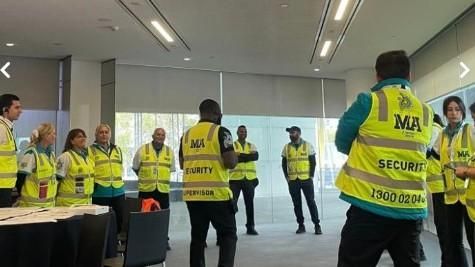
In the lead-up to Christmas, the Australian security and facilities services market has been disrupted by the reported collapse of MA Services Group. ABC News has reported that administrators were appointed to MA Services (a Melbourne-based provider of security, cleaning and maintenance services) and that up to 1,700 roles may be impacted nationally. The report states the administrators have flagged immediate service reductions and redundancies, and noted that certain licensing conditions have been breached—meaning the business may be unable to lawfully continue some core functions. The administrators named in the report are Jason Tracy and Glen Kanevsky of Alvarez & Marsal. This is an evolving situation. Below is a practical overview of what’s been reported and what organisations should prioritise right now. What’s been reported publicly Based on the ABC report: MA Services delivered security and related services across every Australian state and territory. Their client base included major retailers (including Coles, Kmart, Aldi, Amazon and Dan Murphy’s), various councils, and Victorian government locations (including Southern Cross Station and Federation Square). Administrators advised there would be immediate scaling back of services, driven by licensing constraints. Employee entitlements and wage payments have become a key concern, with the United Workers Union publicly commenting on the risk to affected staff, including workers who may not qualify for certain Commonwealth support schemes. Coles has also publicly stated it has implemented interim measures while transitioning to a new security provider. What this means for sites and decision-makers When a large provider exits suddenly, the operational risk isn’t theoretical — it shows up immediately at the front door, on the floor, and in the incident register. If you’re responsible for security outcomes (retail, logistics, government, venues, health, or corporate), the priorities are straightforward: 1) Safety and continuity (deliverability) Validate which sites are exposed today: guards, patrols, control room coverage, after-hours response, keyholding, and contractor access. Put temporary coverage in place where required (especially high-risk locations, high-foot traffic, and known shrink/violence hotspots). Confirm who is managing incident response, escalation, and reporting while the transition is underway. 2) Legal and licensing (compliance) Confirm the replacement provider’s licences and ability to perform the required scope in each state/territory. Verify guards are correctly licensed, inducted, and award-compliant (rates, rosters, fatigue management, and supervision). Ensure site instructions, use-of-force limitations, and reporting obligations are current and controlled. 3) Commercial exposure (profitability + cashflow) Review your current contract position: termination provisions, step-in rights, and service credits. Tighten purchase order controls and confirm who can authorise emergency coverage. Avoid “double paying” during handover: reconcile what has been delivered vs. what has been invoiced, and document all interim arrangements. Supporting impacted workers the right way A sudden administration event creates real uncertainty for frontline staff—especially in the final pay cycle before Christmas. For organisations engaging new coverage quickly, there is a responsible way to do this: Use structured mobilisation: licensing checks, quick-turn onboarding, and formal site induction. Maintain ethical labour standards: correct pay rates, clear rosters, safe hours, and supervision. Keep client expectations realistic: rapid coverage is achievable, but quality and compliance must not be traded away for speed. The market will stabilise, but the next 7–14 days will be the pressure point. Our position and readiness At Australian Security Company (ASC), our operating model is built around lawful delivery, controlled mobilisation, and auditable outcomes. In periods of industry disruption, the organisations that do best are the ones that treat security as a regulated service — not a commodity. If your sites have been impacted (or you’re unsure), the fastest path to stability is a short, structured transition plan: Immediate risk triage (by site and trading hours) Interim coverage where required Rapid compliance onboarding (licensing, induction, post orders) Handover into BAU with reporting and KPI cadence Need coverage or a transition plan? If your organisation has been affected by the MA Services administration, we can assist with: Emergency guarding uplift Patrol and keyholding support Site-by-site transition planning Compliance and award-aligned deployment models Contact our team to assess exposure, prioritise critical sites, and lock in a compliant continuity plan. Note: This post is based on publicly reported information from ABC News and administrator statements referenced in that reporting. Details may change as the administration process progresses.
by Nicholas Domartschuk 29 July 2025
At Australian Security Company (ASC), we understand that protecting your people, property, and assets is not just essential—it's urgent. Whether you're a business, facility manager, or homeowner, the cost of security upgrades can sometimes be a barrier to taking action. That’s why we’ve partnered with Finlease, one of Australia’s most trusted equipment finance specialists, to offer flexible finance options tailored to your security needs.
by Nicholas Domartschuk 22 July 2025
A recent Channel 7 investigation has brought to light serious concerns about CCTV systems that could be used in childcare environments. According to a leading cyber security professional, many cameras across Australia are exposed online due to poor configuration — not because the centres themselves were compromised, but because individual cameras were left accessible to the public internet, due to improper installation techniques.
17 July 2025
The body content of your post goes here. To edit this text, click on it and delete this default text and start typing your own or paste your own from a different source.
by Nicholas Domartschuk 17 July 2025
We’re incredibly proud of our ASC & Total Focus Group for securing second place at the Gallagher Charity Golf Day, where the event raised an impressive AUD 57,000 to support Bravehearts in their vital fight against child sexual abuse This annual event—Gallagher’s third since partnering with Bravehearts in 2022—drew over 130 participants to The Palms Golf Course at Sanctuary Cove, marking a record turnout and fundraising total The funds raised translate directly into 380 specialist trauma-informed counselling sessions and safety education for over 4,750 children across Australia A special shoutout as well to Rod & Peter from Goodman Fielder, whose participation helped elevate the event’s impact. We’re grateful to everyone whose efforts made this day a true win—for teammates, Hole‑in‑One donors, and most importantly, Bravehearts.
27 June 2025
Retail crime is a serious problem
by Nicholas Domartschuk 27 June 2025
When planning a vacation or heading out for an extended trip, the importance of home security cannot be overstated. Home security systems are not just a luxury; they are essential for property protection and peace of mind. A well-implemented security system acts as a formidable barrier against potential intruders, ensuring that your home remains safe while you’re away. Security awareness is crucial in today’s world, where burglaries can happen at any time. By understanding the risks associated with leaving your home unattended, you can take proactive measures to safeguard your property. Simple home safety tips such as installing motion sensor lights, using smart locks, and setting up surveillance cameras can significantly enhance your home's defenses. Moreover, consider utilizing services that monitor your property remotely. Many modern security systems come equipped with mobile alerts that keep you informed about any unusual activity while you enjoy your vacation. Implementing these strategies not only protects your belongings but also provides invaluable peace of mind, allowing you to relax fully during your time away from home. Don’t leave the safety of your property to chance—prioritize home security before embarking on your next adventure!
by Nicholas Domartschuk 9 June 2025
What are Mobile Security Patrols?
16 April 2025
Going Away this easter?
by Nicholas Domartschuk 15 April 2025
Why It's Important To Hire A Professional Security Company